Join the waitlist Cart 0
THE WAITLIST

CE HYBRID DJ is almost ready.

Please sign up for the waitlist and you’ll be notified when it’s available.

Notify me about
No spam. Just a note when it’s ready.
JOIN THE WAITLIST
CLOVERDALE ENGINEERINGTHE HYBRID DJ PIPELINE

CE HYBRID DJ.

Your decks in Live.
Your instruments in key.

Send audio, BPM, key info and more from your DJ gear to Ableton Live. Each deck gets its own track, with its title, artwork, waveform and cues alongside.

TRAKTOR / PRO DJ LINK
AUDIO ROUTING + KEY SYNC
TRACK KEY → LIVE → SCALE
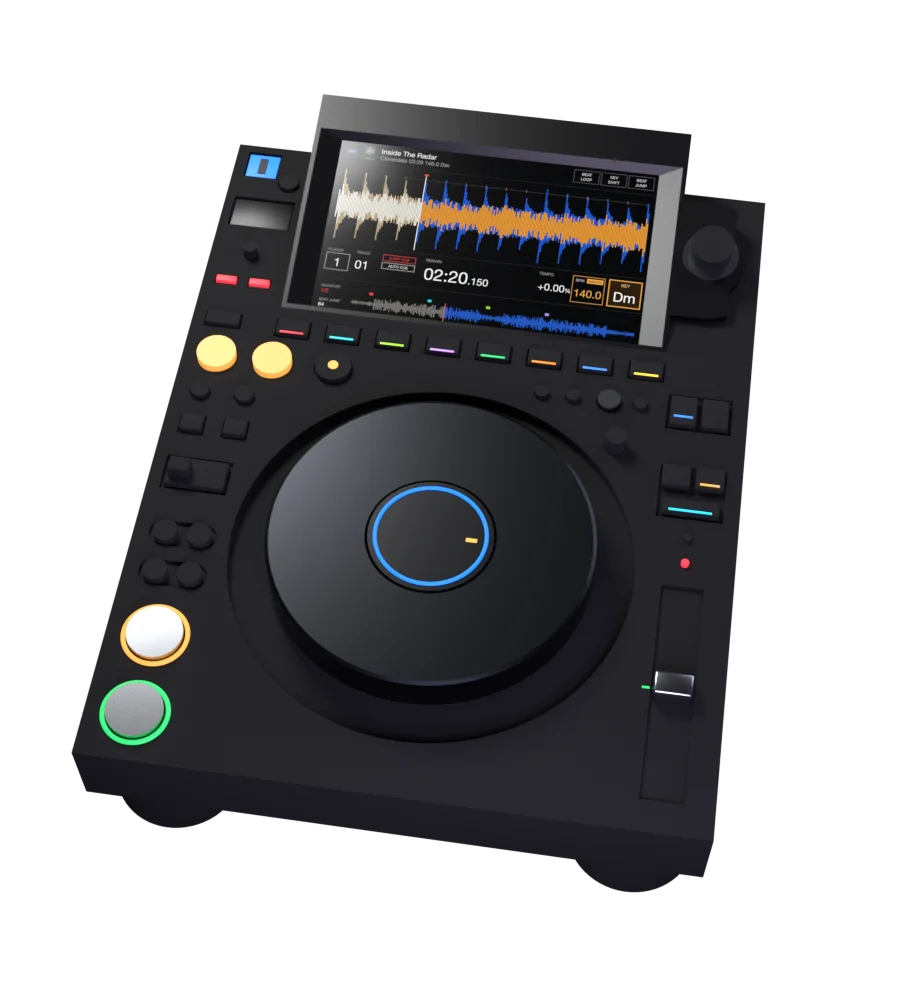
CDJ / PRO DJ LINK
Black CDJ-3000 showing a track in D minor
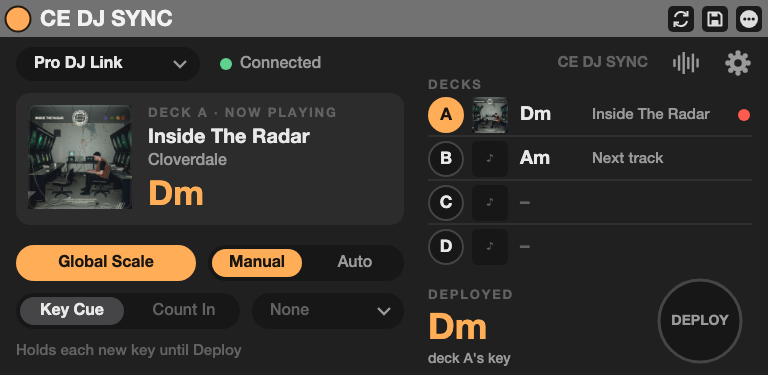
ABLETON LIVE / CE DJ SYNC
CE DJ SYNC receiving and deploying D minor
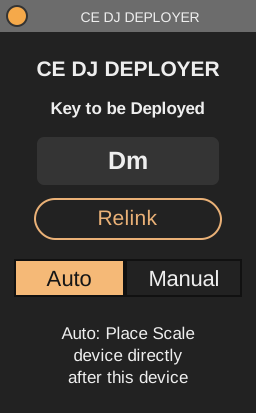
CE DJ DEPLOYER
CE DJ DEPLOYER applying D minor in Auto mode
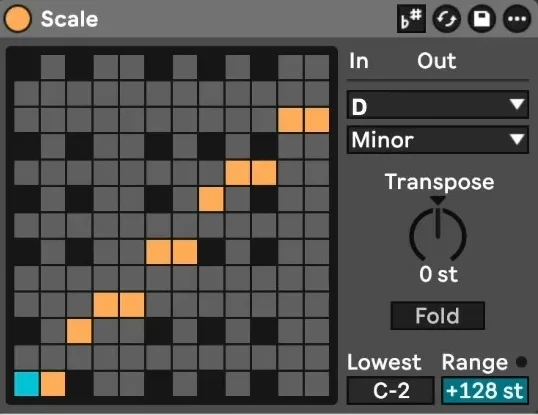
SCALE / D MINOR
Ableton Scale device set to D minor
AUDIO TRACK / CE DJ DECK
CE DJ DECK playing the deck's audio on its own track
Preparing signal flow…
PRO DJ LINK → CE DJ SYNC → CE DJ DEPLOYER → SCALEMIXER USB AUDIO → CE DJ DECKILLUSTRATIVE SIGNAL FLOW / D MINORDrag to rotate

DJ with the tracks you love.
Play something of your own alongside them.

CE HYBRID DJ brings deck audio and key information into Ableton Live. Mix through your own effects, add drums and synths, and decide exactly when the rest of your Set follows the next track’s key.
01 / BRING THE AUDIO

Your decks.
Your Live mixer.

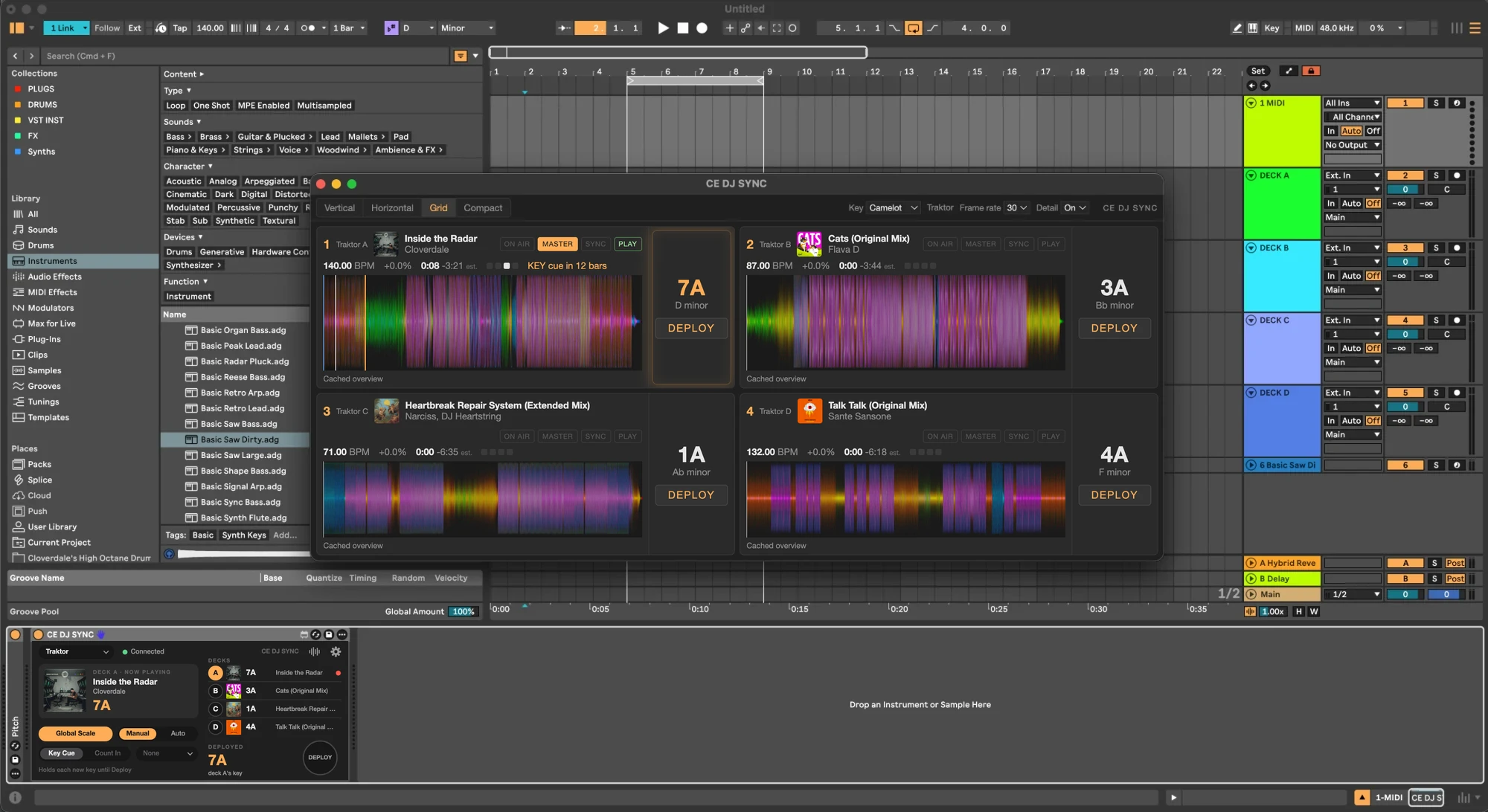
Give each deck its own audio track. Add effects, record a transition, or build a live arrangement around the music you’re mixing.

Ableton Live with tracks DECK A to DECK D, one for each Traktor deck, and the CE DJ SYNC window showing all four decks
Four Traktor decks on four CE DJ DECK tracks, with the CE DJ SYNC window open
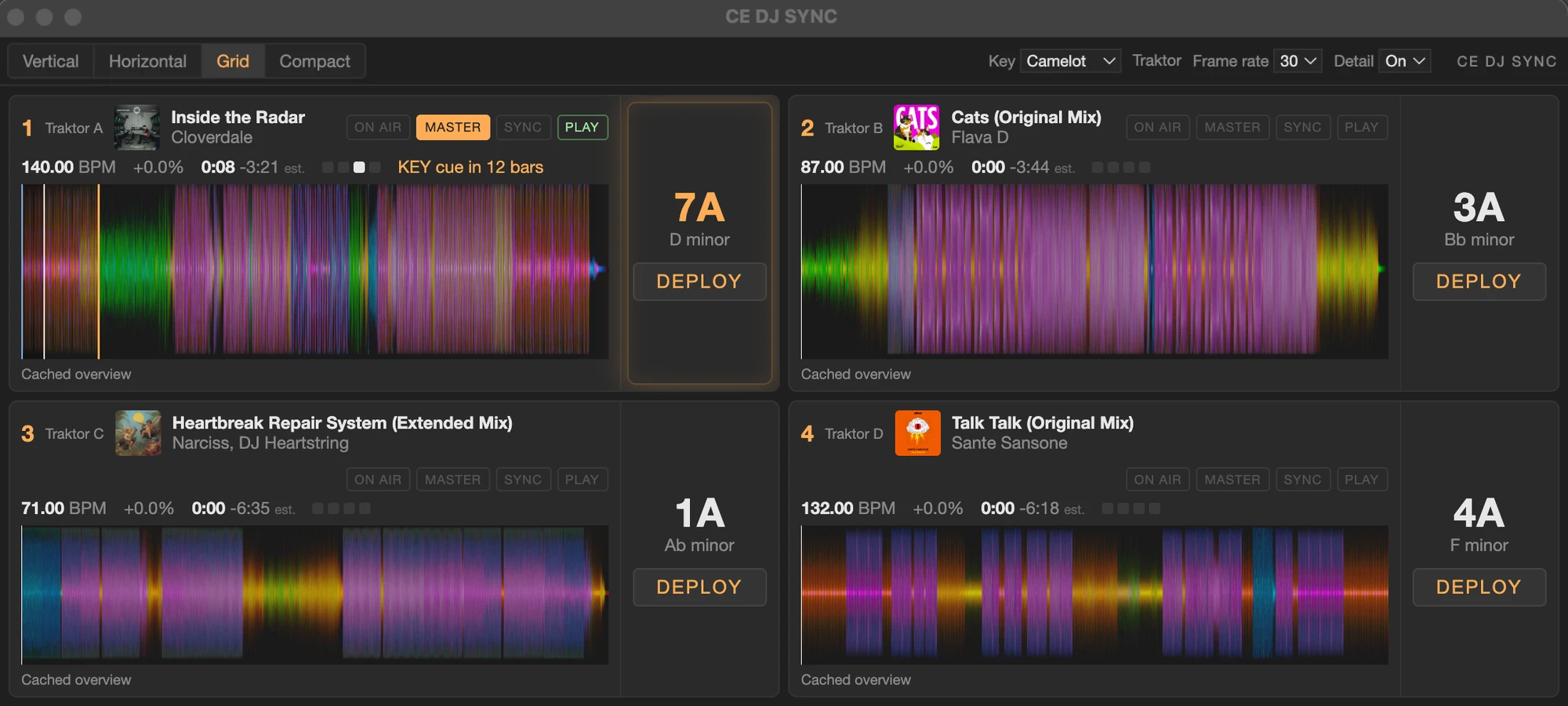
The CE DJ SYNC window in Grid view: each deck's artwork, title, key, waveform and a Deploy button
CE DJ SYNC window · every deck’s track, key and Deploy button
TRAKTOR

HYBRID DJ Bridge

Traktor sends each deck to the Bridge as its own stereo pair. CE DJ DECK reads it directly, so Live keeps your audio interface for inputs and outputs. In External mixing mode, mixing, EQ and headphone cue move out of Traktor.

CDJS + MIXER

Mixer USB audio

Pro DJ Link carries player information; the mixer’s USB connection carries audio. Choose a USB channel pair in each DECK while Live keeps the audio interface you choose.

A MIDI track's device chain: Sting 2, CE DJ DEPLOYER with Dm as its incoming key, Live's Scale device set to D minor, and Wavetable
A MIDI track · CE DJ DEPLOYER hands the deployed key to Live’s Scale device, ahead of the synth
KEY + TRACK DATA

Traktor API or Pro DJ Link CE DJ SYNC Live’s Global Scale

02 / BRING THE KEY

The next track.
The right moment.

A new track doesn’t have to mean a new key straight away. Deploy it yourself, at a cue, or after a count-in. Live’s scale-aware instruments and effects can follow.

TRY A KEY HANDOFFILLUSTRATION / NO AUDIO

1. Choose a deck

2. Send its key
LIVE GLOBAL SCALEA minorStarting key · A minor

Choosing a deck leaves the current key in place. Press Deploy when you’re ready. This example shows the manual workflow; it does not connect to Live.

01 / MANUAL

You call it.

Choose a deck and press Deploy. Keep the current scale through a blend, then change it when the new track takes over.

02 / KEY CUE

Mark the moment.

Use a cue named KEY in Traktor. With Pro DJ Link, use a KEY cue comment or a selected hot cue number.

03 / COUNT IN

Give it a few bars.

In Auto mode, wait a set time after playback starts before deploying the key. Choose from a quarter note up to 32 bars.

03 / INSIDE THE SET

One connection.
A place for every deck.

Use CE DJ SYNC on its own for key deployment. Add CE DJ DECK to bring the audio into Live, then extend the key to individual device chains.
THE HUB / ONE PER SET01

CE DJ SYNC

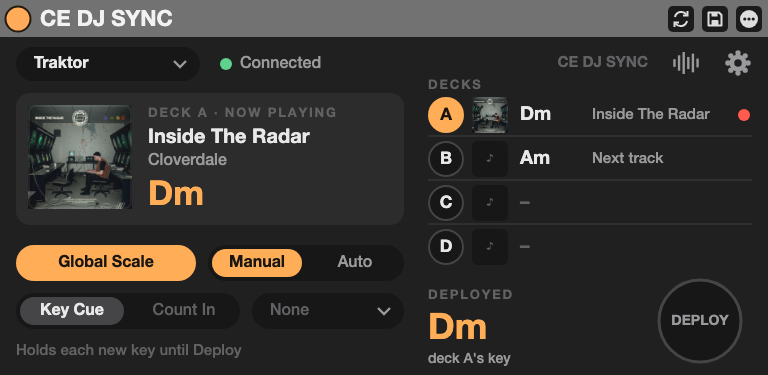
CE DJ SYNC device interface

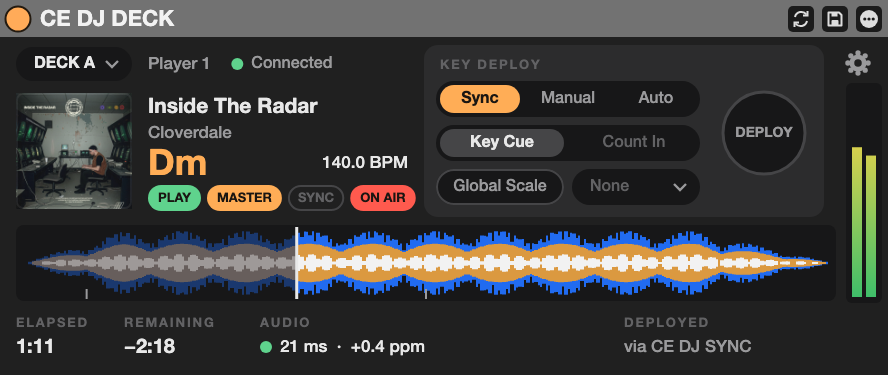
Connect to Traktor or Pro DJ Link. See the decks’ keys, choose how they deploy, and send the selected key to Live’s Global Scale or your Deployers.
THE AUDIO / ONE PER TRACK02

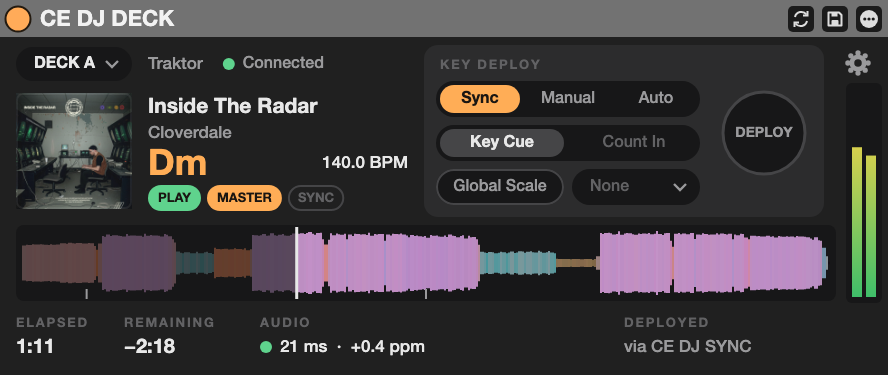
CE DJ DECK

CE DJ DECK device interface

Bring one deck’s audio onto a Live track, with its waveform, track information and meters. Follow CE DJ SYNC or give that deck its own Manual or Auto deployment controls.

ROUTE

HYBRID DJ Bridge

The macOS virtual audio device that carries Traktor’s separate deck outputs into CE DJ DECK.

DEPLOY

CE DJ DEPLOYER

Send the selected key to a Scale device in an individual MIDI chain.

MAP

CE SCALE MAPPER

Read a Scale device and drive a Pitch device, another Scale device or a Macro.

04 / KEEP IT IN VIEW

Your decks.
At a glance.

Open a separate deck display with track information, artwork, waveforms, cues and key deployment. Choose Grid, Horizontal or Compact view to fit your setup.

Available detail depends on the source and track metadata.
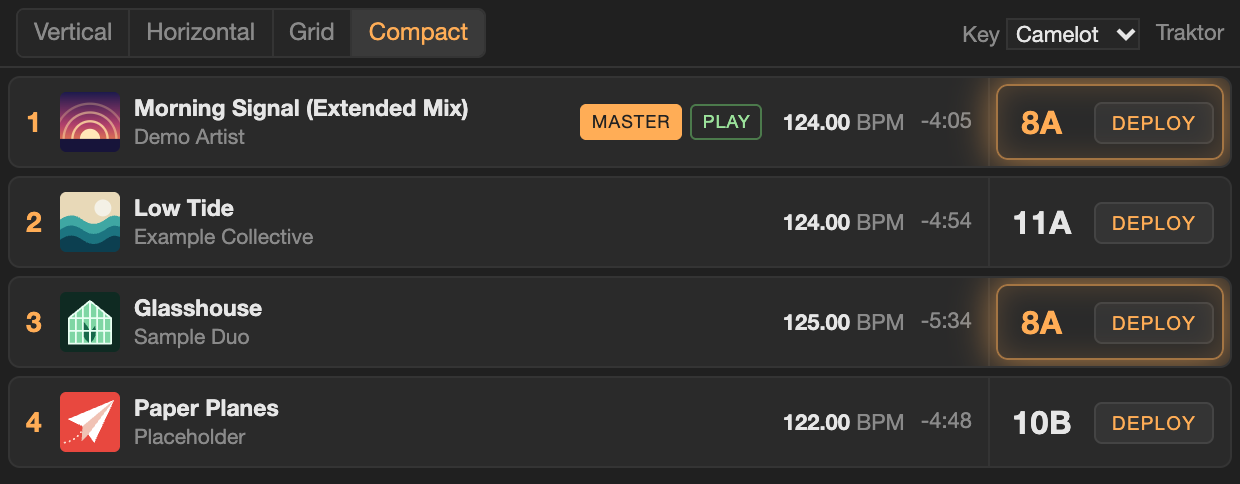
CE HYBRID DJ Deck View in the Compact view, showing four demo decks with their artwork and keys
DECK VIEW / COMPACT VIEW · ILLUSTRATIVE TRACKS AND ARTWORK
SETUP + COMPATIBILITY

Build around
your DJ setup.

REQUIREMENTS

What you’ll need.

  • macOS — the Bridge and CE DJ DECK are Mac-only.
  • Ableton Live 12.2 or later with Max 9: Suite, or Standard with Max for Live.
  • Traktor Pro on the same Mac, with the Traktor API client installed; or Pro DJ Link players on the same network.
  • For CDJ audio: a mixer that exposes individual channels over USB.

Pro DJ Link hardware validation is still in progress. Supported player and mixer models will be confirmed before release.

THE USER MANUAL

Follow the whole signal path.

Audio setup, deck controls, key deployment, Deck View, Deployer and Scale Mapper — with interactive device faces.

Read the user manual
THE WAITLIST

CE HYBRID DJ
is almost ready.

Please sign up for the waitlist and you’ll be notified when it’s available.

Notify me about
No spam. Just a note when it’s ready.
CE HYBRID DJ / MAX FOR LIVE

Make the mix
your own.

ALMOST READY

Release details to follow.
Be the first to know.

Join the waitlist ↑
A NOTE FROM CLOVERDALE ENGINEERING

Hey, it’s Clove,

Over the past few months I’ve been hard at work diving into the world of plugin development. I’ve developed DRUMSEQ, CROSSDRIVE & MIX BUS as tools I really wanted to play with. Push 3 compatible devices that are easy to set up, understand and use.

For now the devices are in private beta (apply here) however you can sign up for the waitlist below to be notified when they become available.

Thanks for your love & support,Alex

Notify me about
No spam. Just a note when it’s ready.